Kardi Ai Beatwell App Settings
This guide helps you easily navigate the settings of the Kardi Ai app.
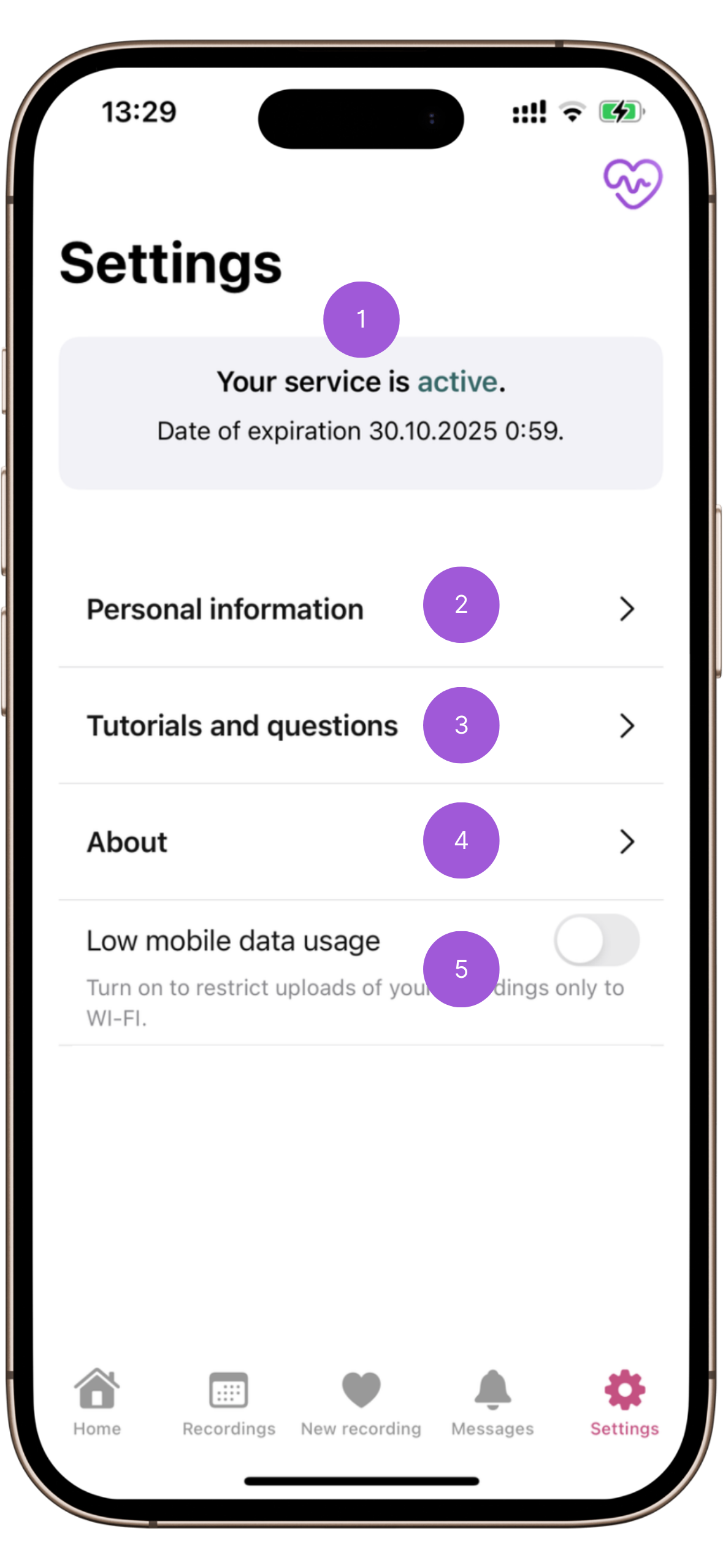
-
Account Status
- Displays the status of your account—whether Kardi Ai Beatwell is active or inactive (based on subscription validity).
- The expiration date of your subscription.
-
Personal Information
- Contains your personal and contact details.
- In case of discrepancies, contact Kardi Ai Beatwell customer support.
-
Guides and FAQs
- Link to detailed Kardi Ai Beatwell guides.
-
About the App
Basic information about the Kardi Ai Beatwell app
 .
.- App Logs
- Displays detailed app operations.
- In case of technical issues, you may be asked to send app logs to the email support@kardi.ai.
- Disconnect App
- Button for logging out of your user account.
- The app will return to its initial setup state.
- Your records are securely stored in the cloud, so they will not be deleted.
- App Logs
-
Save Mobile Data
- Option to send records only via Wi-Fi internet connection.
- In case of issues with record transmission, you may be asked to deactivate this option.
-
Accelerometer Recording
- Planned functionality enabling the monitoring of intensity levels.
Need help?
Contact Kardi Ai customer support
☎️ +420 779 998 100
✉️ support@kardi.ai